
The Shared Inbox Nobody Controls
Every finance and operations team has at least one inbox that runs by whoever gets there first. The AP inbox. The orders inbox. The supplier queries inbox. Emails arrive, someone reads them, and something manual happens. Numbers get copied into a spreadsheet. A bill gets keyed into NetSuite. An approval gets chased over Teams. If the person who normally handles this is off, the email waits.
The process works after a fashion. Bills get paid. Orders get confirmed. But it is fragile in ways that only become visible when something goes wrong. There is no audit trail. Errors come from transcription, not from bad decisions. Consistency depends entirely on who handled the email that day, and how much else was happening when they did it.
Why a Single AI Action Is Not Enough
The instinct is to point an AI at the inbox and have it take actions. Extract the invoice, create the bill, send the confirmation. That sounds like automation, and in a narrow sense it is. But a single-step AI approach introduces its own risks.
The agent cannot tell a legitimate supplier invoice from a fraudulent one unless you specifically test for that. It has no independent check on whether it followed your documented procedure. It takes an action and moves on. If it got something wrong, you find out later, when it matters.
There is also a second problem: the AI cannot tell you, after the fact, whether it deviated from policy. It does not review its own work. That is not a feature of any single-step approach, regardless of how capable the underlying model is. Speed without control is not progress. It is just faster mistakes.
How the Three-Step Pipeline Works
Workflow Autopilot processes each incoming email through three sequential agent steps before any action reaches your systems or your approvers.
Step 1: Security and intent check. Before anything else, the agent assesses the email. Is this a legitimate business communication? Is it a request the system should act on, or something that should be routed to a human without action? The agent checks for indicators of phishing, social engineering, and requests that fall outside the expected scope of the inbox. Suspicious or ambiguous emails are flagged rather than processed.
Step 2: Process and action. Once an email clears the first step, the agent gets to work. It extracts the relevant data — invoice fields, purchase order lines, customer details — validates those against NetSuite, and produces a structured business object: a proposed bill, a draft sales order, a suggested reply. This is not a free-form summary. It is a reviewable record with defined fields that can be edited, approved, or rejected.
Step 3: Policy compliance check. A second agent then reviews what the first agent did. Did it extract the correct fields? Did it apply the right coding? Did it flag the discrepancies it should have flagged? This step is specifically designed to catch cases where the processing agent acted outside your documented procedure, before that output reaches a human or posts to any system.
Optional: Human approval. For sensitive actions — posting a bill, confirming a sales order — the processed artifact goes to an operator for review and explicit sign-off before anything touches NetSuite. This step is not optional for those action types. It is a structural requirement. For lower-risk actions, it can be configured to proceed automatically once the three steps are clear.
The result is not just a faster inbox. It is a process that runs the same way every time, catches the categories of failure that matter most, and leaves a complete record of what happened at each step.
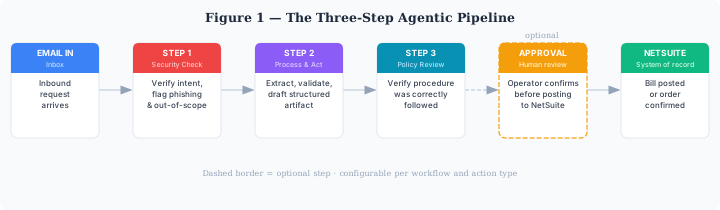
Each email passes through three sequential agent steps before any action reaches your systems or approvers.
AP Bill Processing: A Concrete Example
Consider accounts payable. A supplier sends an invoice to your AP inbox.
Step 1 checks the sender, the content structure, and the request type. It is a legitimate invoice from a known supplier. It passes.
Step 2 extracts the invoice fields, matches them to an open purchase order in NetSuite, checks whether the amounts are within tolerance, and drafts a proposed bill. If there is no matching PO, or if the amounts are outside tolerance, it flags the discrepancy rather than proceeding.
Step 3 reviews the extraction and the matching logic. Did the agent capture the correct invoice number? Did it apply the right VAT treatment? Did it correctly identify the discrepancy? If everything checks out, the artifact goes to an approver.
The approver sees the original email, the extracted invoice data, the matched PO, the proposed bill, and a summary of any issues. They approve or send it back with a note. On approval, the bill posts to NetSuite. The full sequence — email receipt, three agent steps, approval decision — is logged with timestamps.
What this removes from your team's workload: manual field transcription, the effort of pulling up the PO to compare, the back-and-forth of chasing approvals by email, and the gap in the audit trail between receiving an invoice and posting the bill.
Sales Order Processing: The Customer Side
The same pipeline applies to inbound customer purchase orders. A customer sends a PO by email. Step 1 checks it is a genuine order from a known contact. Step 2 extracts the order lines, validates product codes and pricing against NetSuite, and drafts a sales order. Step 3 reviews the draft for completeness and policy compliance — correct pricing tier applied, MOQ rules observed, credit status checked.
The draft SO goes to an operator for confirmation before NetSuite is updated. For standard orders from regular customers, the three steps and approval process takes minutes rather than the manual equivalent. For complex orders with unusual terms, the operator gets a pre-built draft to review rather than starting from scratch.
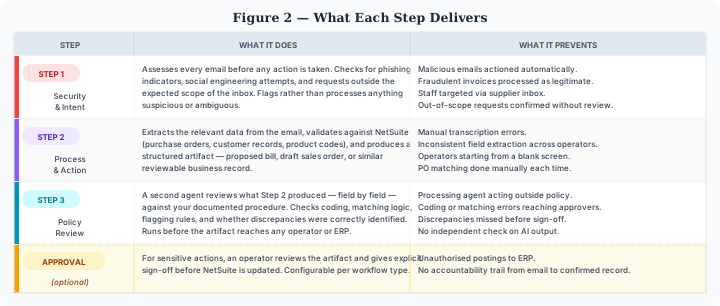
Each step targets a specific category of failure. Together they give you a process you can rely on and audit.
Consistency at Scale
The value of a three-step pipeline becomes clearer at volume. If your team handles thirty AP invoices a week manually, the quality of that work varies depending on who is at their desk and how much else is happening. The agent handles each one the same way. Step 1 runs the same checks on every email. Step 2 applies the same extraction and validation logic. Step 3 asks the same review questions.
Exceptions are handled explicitly rather than quietly. When the agent cannot match a PO or flags a suspicious sender, that appears in the audit log as a deliberate decision point, not a gap. Over time, you can see exactly what kinds of exceptions your inbox generates and whether your procedures are handling them well.
This is what makes inbox automation useful rather than just fast. A shared inbox where everyone does their best is hard to measure and harder to improve. A pipeline with explicit steps and a complete log is a process you can understand, audit, and change.
Not a Chatbot, Not RPA
Workflow Autopilot is not a chatbot. It does not answer questions or generate reports on demand. It runs defined operational processes, from a defined inbox, with defined steps and defined outputs.
It is also not RPA. Traditional robotic process automation follows rules, but those rules have to be written as code and re-coded every time a process changes. It breaks on variation. A supplier sends a PDF in a different format and the bot stops. The agent-based approach handles variation differently: it understands the request in context, applies your documented procedures, and flags what it cannot confidently handle rather than failing silently.
The platform works best when there is a real procedure to codify, even if that procedure currently lives only in one person's head. If you have a workflow that runs through a shared inbox, involves keying data into NetSuite, has approval steps happening informally over email or chat, and produces no reliable audit trail — Workflow Autopilot was built for that problem.
Fowlers Consulting Services Ltd are an AI-first NetSuite consultancy based in the UK. If you would like to talk through whether your inbox workflows are a fit for Workflow Autopilot, get in touch.