
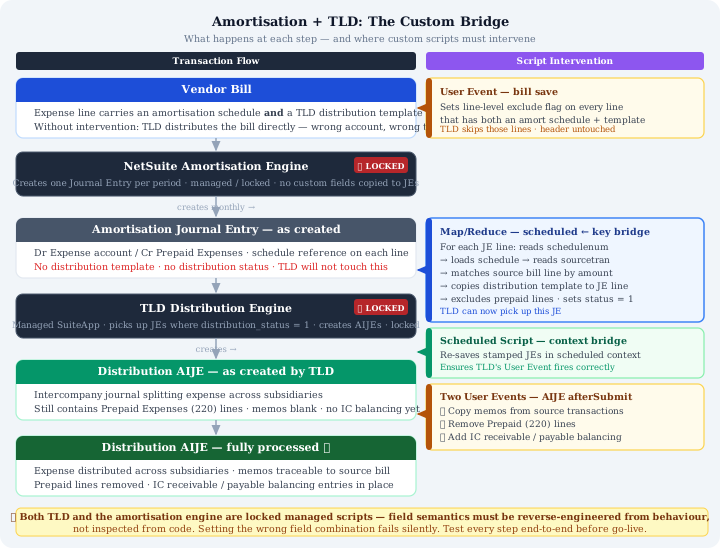
Some NetSuite implementation challenges are difficult because the requirement is genuinely complex. Others are difficult because two standard features that each work correctly in isolation turn out to be fundamentally incompatible with each other, and bridging them requires reverse-engineering behaviour you cannot inspect.
This article is about the second kind.
We recently completed a remediation engagement where a client needed expense amortisation and Transaction Line Distribution to work together on the same vendor bill lines. A previous implementation had attempted this, produced a system that appeared to work but did not, and left behind custom scripts that were either broken or actively causing problems. Untangling it — and building something that actually runs automatically — required a detailed investigation into how both modules work, how they interact, and critically, what you must not do when writing code that touches either.
How NetSuite Expense Amortisation Works
NetSuite's expense amortisation feature — sometimes also referred to as prepaid expense amortisation — allows a vendor bill to be posted as a prepaid asset and then expensed across multiple future accounting periods on a defined schedule.
When you attach an amortisation schedule template to a vendor bill line, NetSuite does two things. First, when the bill is posted, the line posts to the Prepaid Expenses balance sheet account rather than directly to the expense account. The credit goes to Accounts Payable as normal — the bill is a liability — but the debit goes to Prepaid Expenses rather than hitting the P&L immediately.
Second, NetSuite creates a series of Journal Entries, one per accounting period defined by the schedule. Each amortisation JE contains two sides: a debit to the expense account (releasing the prepaid balance into the P&L) and a credit back to Prepaid Expenses. Over the schedule's lifetime, the prepaid balance amortises to zero and the full expense has been recognised in the correct periods.
These amortisation Journal Entries are flagged as isrevrectransaction = true in NetSuite's data model. Each line on the JE carries a schedulenum field linking it to the specific amortisation schedule, and the schedule record itself carries a sourcetran field linking back to the original vendor bill. This chain of references — bill → schedule → JE → schedule → bill — is how NetSuite connects the dots.
The important thing to understand is that this is a largely automated process. NetSuite's amortisation engine creates the JEs. You do not create them manually. They appear in the correct periods and post the correct amounts. The accounting is correct.
What the amortisation engine does not do is carry any custom field values from the source bill onto the generated JEs. The JEs it creates are bare — they have the right accounts, amounts, and schedule references, and nothing else.
How Transaction Line Distribution Works
Transaction Line Distribution — TLD — is a NetSuite SuiteApp developed by Oracle and distributed as a managed package. Its purpose is to distribute expenses posted in one subsidiary across multiple subsidiaries, creating intercompany journal entries to record the cross-subsidiary charge.
The mechanism is field-driven. You add a distribution template to a transaction line — custcol_vid_distribution_template — which defines the source subsidiary, the target subsidiaries, and the percentage split. At the header level, you set a distribution status field to 1 (For Distribution). The TLD engine, which runs as a scheduled Map/Reduce script, picks up any transaction with that status and creates the distribution journals — either Advance Intercompany Journal Entries (AIJEs) for intercompany splits, or regular JEs for intracompany splits within a single subsidiary.
TLD is a locked package. The scripts that implement it are managed by Oracle and not editable. Their internal logic — exactly which fields they read, in what order, under what conditions — cannot be inspected directly. You can observe what TLD does from the outside, but you cannot read the code that makes it do it.
Why the Two Modules Obstruct Each Other
Consider a vendor bill line that has both an amortisation schedule and a distribution template. The intent is clear: the expense should be spread across periods by amortisation, and each period's expense should be distributed across subsidiaries by TLD. The two operations should happen in sequence — amortise first, distribute the resulting JE.
In practice, neither module handles this correctly without intervention.
TLD will attempt to distribute the bill directly. When TLD's engine runs and finds a vendor bill with distribution status 1 and line templates set, it will create a distribution journal for the bill itself. But distributing the bill is wrong — the expense is sitting in Prepaid Expenses and has not yet hit the P&L. Distributing a prepaid asset is not the same as distributing an expense, and it will produce double-counting once the amortisation JEs are processed and distributed in subsequent months.
The amortisation JEs have no distribution templates. NetSuite's amortisation engine creates JEs with the correct amounts and schedule references, but it does not copy TLD-related custom fields from the source bill. The JEs have no line templates, no distribution status. TLD's engine will not touch them. The distribution that should happen — spreading each month's expense release across subsidiaries — simply does not happen automatically.
The result, if you do nothing, is a choice between two wrong outcomes: distribute the bill directly (wrong accounts, wrong timing) or don't distribute anything (expense sits in one subsidiary when it should be spread).
What Bridging This Gap Requires
Connecting the two modules requires custom scripting that does three things:
First, prevent TLD from distributing the vendor bill directly. When a bill line has both an amortisation schedule and a distribution template, that line must be excluded from TLD distribution at the bill level. The correct mechanism is the line-level exclude flag — custcol_vid_exclude_distribution — set to true on each such line. This tells TLD to skip those specific lines while leaving other lines (without amortisation schedules) free to be distributed normally.
Second, carry the distribution template from the source bill onto each amortisation JE. When the amortisation engine creates its monthly JEs, a custom script must find the relevant JE, trace back through the schedule chain to the original bill line, read the distribution template from that bill line, and stamp it onto the corresponding JE line. It must also set the header-level TLD fields that signal the JE is ready for distribution.
Third, handle the post-distribution cleanup. The amortisation JE contains both the expense line (debit to expense account) and the prepaid release line (credit to Prepaid Expenses). TLD will try to distribute both. The prepaid line must be excluded from distribution — you want to distribute the expense recognition, not the balance sheet movement. Additionally, for intercompany distributions, the resulting AIJE needs intercompany balancing entries added and the prepaid lines removed from it before it is complete.
That is the correct design. Getting to it required dismantling a previous implementation that had attempted most of these steps but had critical flaws in each one.
The Locked Scripts Problem
This is where the engagement became genuinely difficult, and where the most important lessons live for anyone attempting something similar.
Both TLD and the amortisation engine consist of locked SuiteApp scripts. When you write custom code that interacts with either module, you are writing to an interface you cannot fully inspect. You know which custom fields exist — they are visible in the field definitions. You do not always know exactly how those fields are used internally, which combinations are valid, what triggers a particular behaviour, or what will cause a silent failure.
The original implementation had made several errors of this type:
The header-level lock. To prevent TLD from distributing the bill, the original script set custbody_vid_distribution_status = 2 (Distributed) at the header level. This appeared to work — TLD left the bill alone. But setting the header status to Distributed blocked distribution for the entire bill, including lines that had only a distribution template and no amortisation schedule. Any future bill with a mix of amortised and non-amortised distributed lines would have its non-amortised lines silently skipped. The correct approach — line-level exclusion — leaves the header status alone and excludes only the relevant lines.
Setting the header default distribution template. On the amortisation JEs, the original script set custbody_vid_default_dist_tmplt — the header's default template — in addition to setting line-level templates. This caused TLD to attempt distribution using the header default on all lines, including the Prepaid Expenses lines that should not be distributed. The header default instructs TLD to apply a template to lines that do not have a line-level template set. Prepaid lines, having no line-level template, picked up the header default and were included in distribution. The Prepaid Expenses account then appeared in distribution journals where it should not.
Template matching against truncated strings. The post-processing script — the one that removes prepaid lines from AIJEs and adds intercompany balancing entries — identified amortisation JEs by matching the amortisation schedule template name as a text string. This is fragile. More significantly, investigation of the actual database revealed that one template's name was stored in a truncated form (Straight-line, prorat...period (period-r) — not a display truncation but the literal stored value. The script's matching condition happened to use this truncated string correctly, but only because someone had reverse-engineered the actual stored value by examining the data rather than the UI.
The script that had never run. The most significant discovery was that the critical automation script — the one responsible for carrying distribution templates from source bills onto amortisation JEs — was hardcoded to process a single specific JE internal ID. Every other filter had been commented out or overridden. The script had been configured with a single scheduled execution and had never actually run. The finance team was manually stamping distribution templates onto every amortisation JE every month. The automation had never existed.
Execution Context and the Re-Save Problem
One of the more subtle challenges was getting TLD to actually process the amortisation JEs after the distribution fields had been stamped.
TLD's distribution engine fires on transaction saves via its own User Event scripts. When our Map/Reduce script loaded and saved an amortisation JE after stamping the distribution fields, TLD was expected to pick it up and create the distribution journal. In some contexts this worked. In others, the JE sat with distribution status 1 and no distribution journal was created.
The root cause was execution context. When a Map/Reduce script saves a record, it does so in the Map/Reduce execution context. TLD's User Event may behave differently — or may not fire at all, or may fire but encounter a governance limit that prevents completion — when the triggering save comes from a Map/Reduce rather than a user action or a scheduled script context.
The solution was an additional scheduled script that runs after the Map/Reduce completes. Its sole purpose is to find JEs that have been stamped with distribution fields but have not yet had a distribution journal created, load each one, and save it — in the scheduled script context. This gives TLD's User Event a clean execution context to fire in. It is inelegant but necessary, and it reflects the reality of working around locked modules: you sometimes need to provide the exact conditions those modules expect rather than the conditions that would be most logical from your own perspective.
What a Correct Implementation Looks Like
The working solution is a chain of scripts, each with a clearly defined role:
A User Event on vendor bills fires on save and sets the line-level exclusion flag on any line that has both an amortisation schedule and a distribution template. It does nothing to the header. It handles both the item and expense sublists. It clears the flag on lines where the amortisation schedule has been removed.
A Map/Reduce script (our rewrite of the original broken script) runs on a schedule. It finds amortisation JEs that have not yet been stamped. For each JE, it traces each line's schedule reference back to the source bill, reads the distribution template from the matching source line, and stamps it onto the JE line. It sets only the header fields TLD needs — template type and rate type — and sets distribution status to 1 to signal the JE is ready. It explicitly excludes prepaid lines from distribution using the line-level exclude flag. It does not set the header default template, which would cause the exclusion to be overridden.
A Scheduled Script then runs and re-saves any stamped JEs that have not yet received a distribution journal, in a fresh execution context that TLD's engine can reliably fire on.
A User Event on the resulting distribution journals copies line memos from the source transactions and adds intercompany balancing entries, removing the prepaid account lines that TLD included and replacing them with the correct intercompany receivable and payable entries.
The chain is long because the gap between the two modules is wide. Each script has one job, and the scripts are independent enough that failures are localised — a single JE failing does not block the batch.
What to Take Away If You Are Attempting This
Understand the field semantics before writing a single line of code. For TLD specifically, understand the difference between the header default template and the line-level template, and understand what each combination of those fields signals to TLD's engine. Setting the wrong combination does not produce an error — it produces a distribution you did not intend, or no distribution at all.
Use line-level controls, not header-level controls, wherever possible. Header-level fields on TLD affect all lines on the transaction. When you are working with mixed transactions — some lines amortised, some not — any header-level intervention will affect lines you did not intend to touch. Line-level exclusion flags are more surgical.
Trace the field chain before writing the stamping logic. The path from amortisation JE line to source bill line goes through the schedule record. That chain is reliable but not fast — each schedule lookup is a record load. A batch that loads records in a try/catch cascade for each line, as the original script did, will hit governance limits on large journals. Search-first approaches are substantially more efficient.
Test in sandbox with scenarios that match production reality. The original scripts appeared to work because the system contained no mixed bills at the time of testing — bills with both amortised and non-amortised distributed lines. The header-level lock only became a problem in theory. But a robust implementation should survive scenarios the current data happens not to contain. The most important test is always the one that was not run.
Document the field inventory before you start. Know every custom field that either module reads or writes. Know which are header-level and which are line-level. Know which values trigger which behaviours. This is reverse-engineering work — it requires examining data from processed transactions, reading audit logs, and occasionally making controlled changes in sandbox and observing the results. It is slow, but skipping it is how the original implementation arrived at a script that had never run and a finance team manually processing journals every month.