
NetSuite has hard dependencies between record types. A transaction cannot reference a customer that does not exist. An item cannot be assigned to a location that has not been configured. Load data in the wrong order and you will encounter validation errors that are not immediately obvious, and when you fix them by loading in the correct sequence, you may find you have already created orphaned or mismatched records that need cleaning up.
The sequence below is not a preference. It reflects the dependency graph of the NetSuite data model. Each step must complete before the next begins. This sequence sits inside our 12-week migration framework.
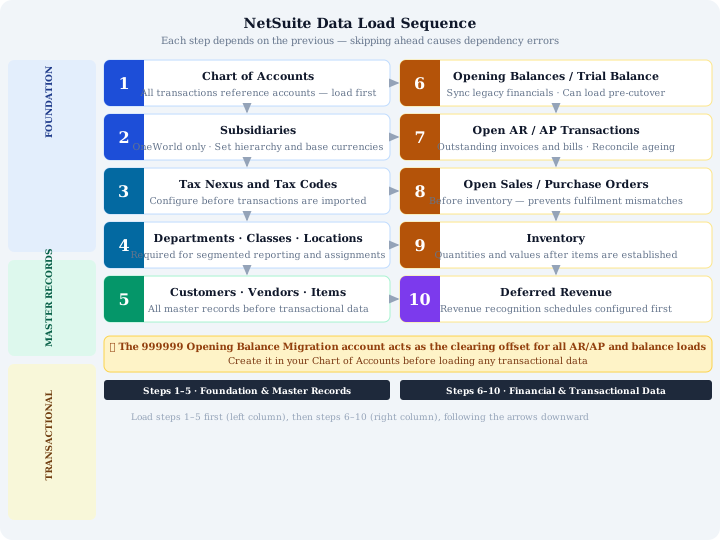
Quick Reference: The 10-Step Load Order
- Chart of Accounts
- Subsidiaries (OneWorld)
- Tax Nexus and Tax Codes
- Departments, Classes, and Locations
- Customers, Vendors, and Items
- Opening Balances / Trial Balance
- Open AR and AP Transactions
- Open Sales Orders and Purchase Orders
- Inventory
- Deferred Revenue
1. Chart of Accounts
Every transaction in NetSuite posts to an account. The chart of accounts must therefore exist before any transactional data can be loaded, including opening balances.
During migration, maintain a mapping table that links each legacy account code to its NetSuite equivalent. This table is essential for reconciliation. Also create a dedicated 999999 Opening Balance Migration clearing account at this stage. You will use it as an offset when loading open AR and AP transactions, and it should net to zero once migration is complete.
Lock the COA before any subsequent loads. Changes to the chart of accounts after mapping is complete invalidate your mapping tables and require rework across every object that references an account.
2. Subsidiaries (OneWorld)
If you are on NetSuite OneWorld, subsidiary hierarchy must be defined before any other record is created. Base currencies are set at the subsidiary level and cannot be changed after transactions exist. Entities, customers, vendors, employees, are associated with subsidiaries, and that association cannot easily be changed after the fact.
Plan your subsidiary hierarchy carefully and get sign-off before loading. This is not a configuration decision you can revise midway through migration.
3. Tax Nexus and Tax Codes
Tax configuration defines your obligations by region. Tax codes need to exist before transactions are imported so that NetSuite can apply correct tax treatment during the load. Without this, you either import transactions with no tax, which may be intentional for historical data, or you encounter validation errors on records that expect a tax code.
For historical open transactions, it is common to load them without tax lines (as single-line postings), but the tax codes still need to exist for the system to function correctly post go-live.
4. Departments, Classes, and Locations
These classification segments must exist before any transaction references them. If you load a customer invoice and attempt to assign it to a department that has not yet been created, the import will fail.
This step is frequently underestimated. Teams focus on the major objects, customers, vendors, and treat segments as configuration rather than data. They are both. Load them as data, validate them, and confirm they match your reporting structure before moving on.
5. Customers, Vendors, and Items
These are your master static records: the entities and products that transactions reference. An invoice needs a customer. A purchase order needs a vendor and an item. None of that is possible if the master records do not exist.
This step typically requires the most data quality work. Expect to find duplicates, incomplete records, and inconsistent naming in your source data. Run multiple sandbox loads to refine the data before attempting transactional loads. Assign External IDs at this stage, they are your link between the source system and NetSuite, and you will need them for every subsequent step.
6. Opening Balances / Trial Balance
With the COA and master records in place, you can synchronise your historical financial position. The opening trial balance brings across the accumulated financial history of the business up to the migration cutover date.
Historical months can be loaded before cutover, you do not need to wait until the final migration window to bring across closed periods. This spreads the reconciliation workload and gives you time to investigate discrepancies before go-live pressure is on.
Reconcile the loaded trial balance against your legacy system before proceeding. Total debits must equal total credits. Every material account balance should be verified.
7. Open AR and AP Transactions
Outstanding invoices and bills are loaded next. These are the open items that will appear on your AR and AP aging reports in NetSuite from day one.
Load these as single-line postings without tax. Use the 999999 Opening Balance Migration clearing account as the offsetting entry. This approach keeps the load clean and separates migration postings from operational postings. For multi-currency businesses, load transactions at their original exchange rates, not the rate on the day of migration. Reconcile the aging reports in NetSuite against your legacy system before moving forward, total outstanding balances must match.
Use source system database keys as External IDs for each transaction. For any multi-line transactions, implement Line Unique Key tracking so you can reconcile and troubleshoot at line level.
8. Open Sales Orders and Purchase Orders
Unfulfilled commitments, orders that have been raised but not yet fulfilled or received, need to be in NetSuite before inventory is updated. If you load inventory first and then bring in open purchase orders, your stock levels and committed quantities will be inconsistent.
This step requires close coordination with the operational teams who own these orders. They need to confirm the open order list is accurate at the point of extraction.
9. Inventory
Inventory quantities and values are loaded after items exist (step 5) and after open orders are in place (step 8). The load sets the stock on hand position in NetSuite to match the legacy system at the migration date.
Reconcile inventory valuation reports against your legacy system. Both quantity and value need to match. Discrepancies here are common because of timing differences between the inventory extract and the order data extract, which is why the extraction sequence matters as much as the load sequence.
The same reconciliation discipline applies post-migration — see the NetSuite month-end close checklist.
10. Deferred Revenue
Deferred revenue is the final transaction type to load. It requires revenue recognition schedules to be correctly configured in NetSuite before the load, and it depends on the correct customer records existing (step 5).
This step is frequently left until last because it is the most complex to model correctly. The revenue recognition configuration needs to reflect the same rules that were applied in the legacy system, and the reconciliation needs to confirm that the deferred balance and recognition schedule match.
Why the Sequence Is Non-Negotiable
Each step in this sequence creates the records that the next step depends on. Skip ahead and you will encounter validation errors. Attempt to fix those errors by loading missing dependencies after the fact, and you risk inconsistencies between the records you have already loaded and the ones you are loading now.
The sequence is also the structure for your reconciliation plan. At the end of each step, you should be able to confirm that what is in NetSuite matches what was in your source system. That confirmation is what makes the final go-live reconciliation manageable rather than overwhelming. Many teams keep running this same reconciliation discipline after go-live using MatchPoint, our NetSuite reconciliation platform.
Getting the Sequence Wrong Is Expensive to Unpick
If your migration has already started and something isn't reconciling, or you want a specialist to plan the load order before you begin, Fowlers Consulting can help. We've managed this exact dependency chain — chart of accounts through to deferred revenue — across 40+ NetSuite migrations.