
Every NetSuite implementation hits the same question early: how far back does the data need to go? The instinct, especially from finance teams, is to load everything. Full transaction history, every journal entry, every invoice going back five years. It feels thorough. In practice, it is almost always the wrong call. This is especially true for growing or multi-entity businesses, where the volume of historical data multiplies with every subsidiary.
The question worth asking is not "how much can we load?" but "what do your users actually need to run post go-live?" The answer to that question usually points to one of three approaches, each with a different scope and complexity trade-off.
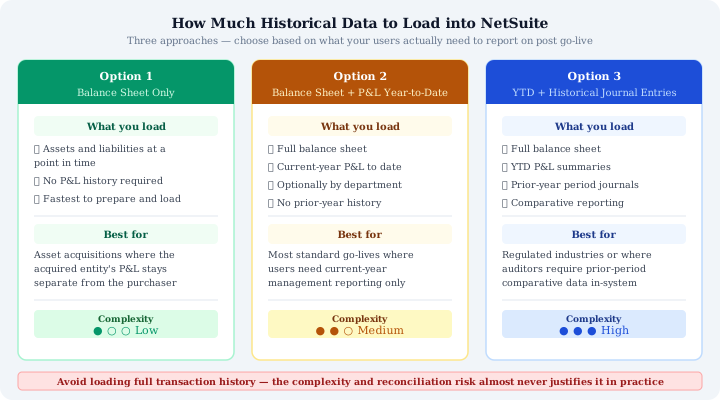
Option 1: Balance Sheet Only
Load assets and liabilities at a single point in time, a clean closing balance sheet, and nothing else. No P&L, no transaction history, just the numbers needed to open the books in the new system.
This is the right approach for acquisitions where you are absorbing another entity. The acquired business has its own prior-year P&L history that belongs in its own records. What matters for the acquiring entity is the balance sheet at the date of acquisition: the receivables, payables, inventory, fixed assets, and liabilities it is taking on.
It is the fastest and cleanest option. Reconciliation is simple, you are matching a small set of account balances against a closing balance sheet sign-off. The risk of introducing errors is low, and the volume of data is minimal.
This differs from a merger, where both entities' income statements typically need to be combined — a materially different and more complex scope.
Option 2: Balance Sheet Plus P&L Year-to-Date
Add to the balance sheet a current-year profit and loss summary through today's date. This can be loaded as a single consolidated P&L figure or broken down by department if management reporting requires it.
For most standard go-lives, this is the correct choice. It gives the finance team current-year actuals in NetSuite from day one, which means month-end reports, departmental P&L, and YTD comparatives all work immediately. You are not loading historical transactions, you are loading a summary that represents the net effect of them.
How to Load NetSuite Opening Balances for Option 2
The key test: if your users only need to compare this month against the same period last year, Option 2 is almost always sufficient. In practice you post the NetSuite opening balances for the balance sheet, then enter the prior year comparative as a statistical balance or a single journal entry per account. No transaction-level history is required to produce the report.
Option 3: Balances with YTD P&L Plus Historical Journal Entries
Where organisations need more historical context, for audit purposes, regulatory requirements, or detailed trend analysis, the third option extends Option 2 by adding individual period journal entries for prior years.
Reconciling Summarised Journal Entries Against Your Legacy System
The mechanism is simple: rather than loading every original transaction, you create one summarised journal entry per accounting period per account. The net effect is identical to loading the underlying transactions, but the data volume is a fraction of the size and the risk of errors is significantly lower. Each period's summarised journal can then be reconciled against the closing trial balance from the legacy system, which keeps the NetSuite trial balance migration accurate without carrying the underlying detail.
This matters because loading old transactional data introduces its own class of problems. Legacy systems contain errors, corrections, and adjustments that compound over time. Migrating those raw transactions into NetSuite does not just carry over the correct closing balances, it carries over all the noise too. Reconciling a five-year transaction history that was accurate in one system but behaves differently in another is an expensive exercise that rarely surfaces actionable insight.
Summarised period journals give you the historical depth without the cumulative accounting errors. This is most common for PE-backed businesses undergoing due diligence, or any business with a statutory audit that expects period-by-period comparatives.
If you're weighing up which option fits a regulated or multi-entity migration, a short planning call can help — book a 20-minute call.
The Risk of Loading Full History
It takes far longer, weeks of extraction, transformation, and validation work that delays go-live. It creates data volumes that make the system slow to navigate in the early months. It introduces errors in old data that are hard to identify and harder to reconcile. And in most cases, the historical transactions are never actually queried once the business is running on NetSuite. They become an archive that nobody opens.
The organisations that do need full transactional history almost always have a specific, articulable reason: a regulatory requirement with a named obligation, an audit currently in progress, a legal matter. If none of those apply, the case for loading full history is largely emotional rather than operational.
Which Approach Is Right?
- Acquisition of another entity: Option 1. Load the closing balance sheet and move on.
- Standard go-live with current-year reporting needs: Option 2. Balance sheet plus YTD P&L, segmented by department if required.
- Regulatory, audit, or detailed historical reporting requirements: Option 3. Balances with YTD P&L plus prior-year summarised journal entries by period.
The decision should be driven by a concrete answer to one question: what reports do your users need to run from day one, and how far back do those reports need to reach? If the answer is "current year and last year comparative," Option 2 covers it. If the answer is "we need to see period-by-period for the last three years," Option 3 covers it without the risk of loading raw transactional data.
Loading full history is almost never the answer. Define the reporting requirement first, then choose the lightest approach that satisfies it. Scoping historical data this way is one of the earliest steps in our 12-week data migration framework, which sets out the full sequence.
Migrating to NetSuite? Get Expert Help
This guide is maintained by Fowlers Consulting, a UK NetSuite consultancy. If you'd rather have specialists handle your data migration end-to-end, talk to our team.