
Most NetSuite migrations fail in the planning phase. By the time the data load starts, the team is already working from incomplete mappings, an unvalidated chart of accounts, and no clear ownership of reconciliation. The loading itself is the easy part, or it should be.
Whether you are migrating from an external system or restructuring internally (a subsidiary merger, for instance), the principles are the same: get your foundations right before you touch transactional data, run multiple sandbox loads rather than one, and reconcile at every stage.
The Three Threads That Run Through Everything
Before getting into the week-by-week plan, three disciplines underpin every phase:
- External IDs: Assign source system identifiers to every record you migrate. They are the only reliable way to track records before NetSuite internal IDs exist, and they allow you to reload or update without creating duplicates.
- Reconciliation at every stage: Do not move to the next phase until the current one balances. A £10 discrepancy in your sandbox AR is infinitely cheaper to investigate now than after go-live.
- Sandbox before production: Every load, including the final one, should have been rehearsed in sandbox. Production go-live is not the time to discover a mapping error.
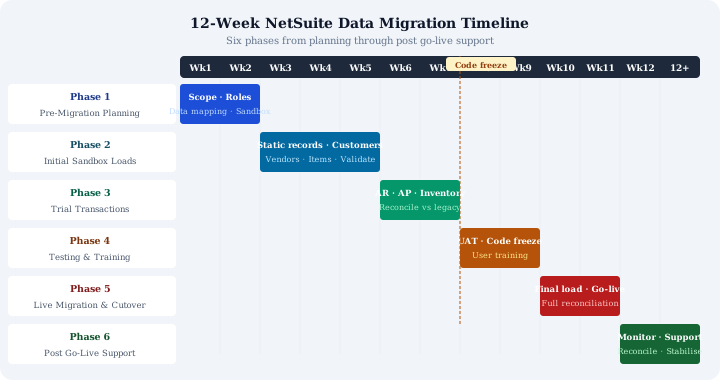
The 12-Week Framework
Weeks 1–2: Pre-Migration Planning
Define scope and assign clear ownership. Who owns the source data extract? Who signs off reconciliation? Who resolves mapping disputes? These sound like governance questions, but unresolved ownership is the single most common cause of delays.
Key deliverables for this phase:
- Finalise the chart of accounts and tax configuration, changes to these after data loads have started cause significant rework
- Complete data mapping documents for every object in scope: customers, vendors, items, transactions
- Stand up your sandbox environment and confirm access for all team members
- Document the full list of legacy data sources, including any that require manual extraction
The COA deserves particular attention. Every transaction in NetSuite references an account. If your COA changes mid-migration, your mapping tables become invalid. Lock it down before the first sandbox load.
Weeks 3–5: Initial Sandbox Loads, Static Records
Load your foundational records first, following the right order to load data: chart of accounts, customers, vendors, and items. These are the records that everything else depends on. Loading them early gives your team time to validate business data quality, not just technical format, before transactional data arrives.
Expect to run this load multiple times. The first pass will surface data quality issues: duplicate customers, missing required fields, inconsistent naming conventions. Each iteration refines the mapping and the source data. Multiple sandbox loads are not a sign of problems; they are the process.
Reconcile against the source system at the end of this phase. Record counts, key field values, customer credit limits, vendor payment terms, validate what matters to the business, not just what is technically required.
Weeks 6–7: Trial Transactional Data Loads
With static records validated, load trial transactional data: open AR, open AP, and inventory. These loads will almost certainly require adjustment. Aging report totals need to match your legacy system. Inventory quantities and values need to reconcile.
Use External IDs drawn from source system database keys. For multi-line transactions, implement Line Unique Key tracking, without it, you cannot reconcile at line level if something goes wrong.
Do not skip reconciliation here because it is a sandbox. The point of the trial load is to prove your reconciliation process works, not just that the data loaded without errors.
Weeks 8–9: Code Freeze, UAT, and Final Static Load
Two weeks before go-live, freeze configuration changes. Any change to the COA, tax codes, or custom fields after this point risks invalidating your mapping tables and your reconciliation work.
This phase runs in parallel:
- UAT with end users validating that migrated records look and behave correctly
- Final load of static records (customers, vendors, items), this is the version that will go to production, so it needs to be clean
- User training on the live system, using real migrated data where possible
Weeks 10–11: Cutover
Data entry in the legacy system ceases. This is a hard stop, any transactions entered in the legacy system after this point will not be in NetSuite, and reconciliation becomes impossible.
Execute the final load to production. Because you have rehearsed this process multiple times in sandbox, it should be procedural rather than exploratory. Run full reconciliation immediately: trial balance, AR aging, AP aging, inventory valuation. Do not sign off cutover until these reconcile.
Week 12 and Beyond: Post Go-Live
The migration does not end at go-live. Plan for:
- Continued reconciliation as the first transactions process through the new system
- User support, people will find edge cases in the migrated data that UAT did not catch
- Monitoring of External ID integrity, particularly if integrations were running against the legacy system
The first month post go-live is when data quality issues that were latent in the legacy system become visible. Budget time for investigation and correction.
What Goes Wrong
The most common failure modes are not technical. They are:
- A single sandbox load treated as sufficient, leaving no time to refine mappings before production
- Reconciliation deferred to post go-live, by which point errors are compounded by live transactions
- COA or tax configuration changes made after mapping is complete, requiring mapping tables to be rebuilt
- No clear ownership of reconciliation sign-off, so discrepancies remain open and unresolved
None of these are inevitable. They are planning failures, and a structured framework, or experienced NetSuite implementation support, prevents them.
Migrating to NetSuite? Get Expert Help
This guide is maintained by Fowlers Consulting, a UK NetSuite consultancy. If you'd rather have specialists handle your data migration end-to-end, talk to our team.