
The assumption is reasonable: if both systems are NetSuite, the data should transfer cleanly. Same platform, same data model, same terminology. Surely you just move the records across?
You do not. Every NetSuite account is independently configured, and there is no automated mechanism to transfer data between them. The moment you treat a NetSuite-to-NetSuite migration as simpler than migrating from an external system, you have already underestimated the work.
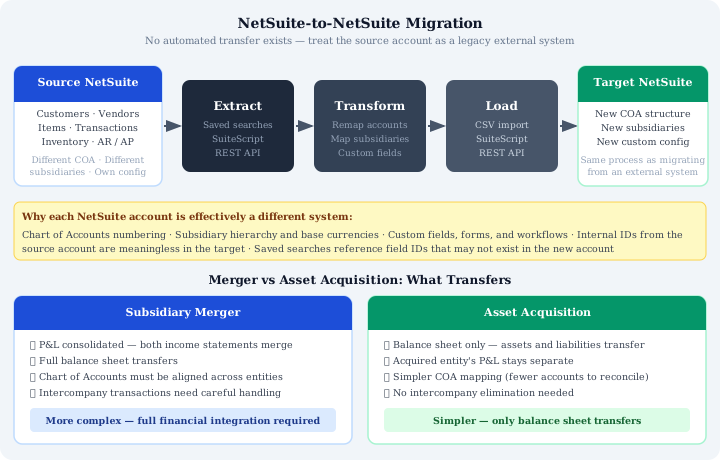
Why Each Instance Is Effectively a Different System
NetSuite provides a framework. What each organisation builds inside that framework is unique to them. Four areas create the most friction in migrations between accounts:
- Chart of accounts structure. Different account numbers, different naming conventions, different groupings. An account called “Trade Debtors” in one instance may map to “Accounts Receivable – Domestic” in another, or may need to be split across two accounts. There is no automatic alignment.
- Subsidiary configurations. Different entities, different hierarchies, different base currencies. A transaction posted to a subsidiary in the source account must be remapped to the correct subsidiary in the target account, which may not have the same structure at all.
- Custom fields, forms, and workflows. Anything built in one account, custom transaction fields, custom record types, workflow automations, does not exist in the other unless it has been independently configured there. Data held in custom fields in the source account has nowhere to go in the target account until that configuration is replicated.
- Internal IDs. Saved searches, workflow conditions, and scripts in the source account reference internal IDs that are specific to that account. Those IDs mean nothing in the target account. Any extraction logic that relies on them needs to be rebuilt against the target account’s own IDs.
The Approach: Extract, Transform, Load
A NetSuite-to-NetSuite migration follows exactly the same methodology as migrating from any external legacy system. Treating it otherwise is the mistake.
Extraction uses saved searches and SuiteScript to pull data from the source account: open transactions, customer and vendor records, inventory balances, and the trial balance. The trial balance extraction warrants particular care. The correct approach is a NetSuite saved search that groups prior-year amounts into Retained Earnings, producing net balance, debits, and credits per account per period. This output becomes the foundation for loading opening balances in the target account.
Transformation is where the significant work sits. Every account in the source must be mapped to an account in the target. Every subsidiary must be remapped. Custom field values must be translated to their equivalents in the target configuration, or a decision made to drop fields that have no target equivalent. A COA mapping document, reviewed and signed off by finance, is not optional; it is the control that makes the load auditable.
Loading uses the same tools as any other NetSuite implementation: CSV imports for master data and simple transactional records, SuiteScript or the REST API for anything requiring more complex logic. The target account is treated as a clean system receiving data for the first time. Because it is.
Merger vs Acquisition: Different Scope
The business event driving the migration determines how much of the source account needs to move.
In an asset acquisition, only the balance sheet transfers. The acquired entity's P&L history stays in its own records, it is not yours to consolidate. The scope is a clean balance sheet migration: receivables, payables, inventory, fixed assets, and any other balance sheet items at the acquisition date. Simpler, faster, and lower risk.
In a merger, both income statements and balance sheets must be integrated. That means chart of accounts alignment across both entities, handling of intercompany eliminations, and decisions about how to present the combined trading history. The transformation work is substantially larger, and the COA mapping exercise becomes a finance project in its own right before the technical migration begins.
Both scenarios share the same FX challenge: foreign currency revaluations on combined balance sheets are difficult to isolate, particularly in mergers where you cannot easily attribute which revaluation entries belong to which migrated transactions. That is handled through the manual journal approach described in the FX article in this series.
Trial Balance Extraction in Practice
Extracting the trial balance from a live NetSuite account for use as opening balances in a target account requires a saved search configured to produce the right output. The search must group prior-year amounts into Retained Earnings rather than showing individual P&L accounts, otherwise you will attempt to recreate historic P&L balances in the target account, which is neither necessary nor desirable for most migrations.
The output should give you: account code, account name, net balance, total debits, and total credits, per period for whichever historical periods you need to load. This feeds directly into the journal entry load for the target account.
If you are loading multiple prior years under Option 3 of the historical data approach, you will need one row per account per period. If you are loading only current-year YTD, you need one row per account. The saved search can be configured for either.
The Mindset That Matters
Treat the source NetSuite account as a legacy external system from day one of the project. Document its configuration. Extract its data via the same tools you would use for any other system. Validate the extract before you begin transformation. Map every field before you begin loading.
The moment you start thinking “it's already in NetSuite so it should be easy,” you will miss the transformation work, underestimate the timeline, and discover the gaps during UAT rather than during design. The platform being the same does not make the data the same. The configuration gap between two NetSuite accounts can be just as wide as the gap between NetSuite and any other ERP.
Migrating to NetSuite? Get Expert Help
This guide is maintained by Fowlers Consulting, a UK NetSuite consultancy. If you'd rather have specialists handle your data migration end-to-end, talk to our team.