
Before NetSuite assigns an internal ID to a record, you need a way to refer to it. During a migration, you are creating thousands of records, customers, vendors, items, transactions, and you need to be able to track each one back to its source, reload it without creating a duplicate, and reconcile it against the legacy system. External IDs are how you do that.
Getting this decision right at the start of a migration is cheap. Getting it wrong is expensive: duplicate records, failed reimports, irreconcilable data, and cleanup work that stretches weeks past go-live. Where External IDs fit into the wider process is something we cover in our 12-week migration framework; this article focuses on the identifier decision itself.
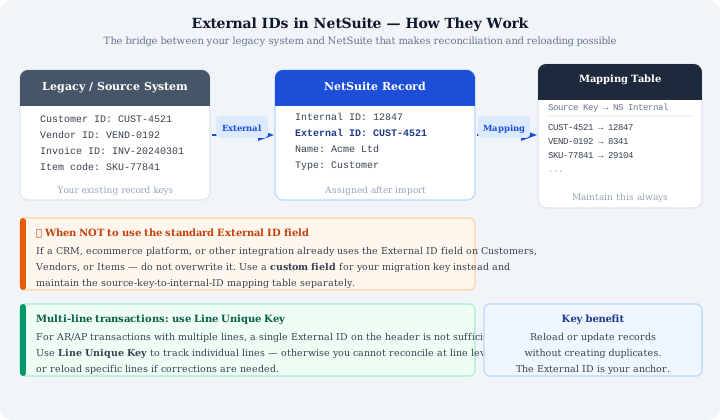
What External IDs Actually Do
An External ID in NetSuite is a value you assign to a record that links it to its counterpart in your source system, and NetSuite uses it as a match key on import. If you attempt to import a record with an External ID that already exists in NetSuite, NetSuite updates the existing record rather than creating a new one. The field accepts letters, numbers, underscores and hyphens, up to 255 characters, and must be unique within a record type.
This behaviour is what makes External IDs essential for migration. You will not load your data once and get it right. You will load it multiple times across multiple sandbox environments, refining mappings, correcting data quality issues, and rerunning failed loads. Without External IDs, every rerun creates new records. With External IDs, reruns update the records you already loaded.
External IDs also exist before NetSuite Internal IDs are assigned. Internal IDs are only created when the record is saved in NetSuite. During the migration process, when you are planning loads, building mapping tables, and writing transformation logic, you need a stable identifier. External IDs provide that stability.
NetSuite Internal ID vs External ID
It is worth being clear on how these two identifiers differ, because they do different jobs. The Internal ID is NetSuite's own reference, generated automatically the moment a record is saved. The External ID is the one you control, and it is what lets you tie a NetSuite record back to wherever it came from.
| Internal ID | External ID | |
|---|---|---|
| Assigned by | NetSuite, automatically | You, during import |
| Exists before record is saved? | No | Yes |
| Used for | NetSuite's own record lookup | Matching records to a source system |
The Complication: Integrations That Already Use the Field
NetSuite exposes a standard External ID field on most record types. The instinct is to use it for migration. In many cases, that is correct. But there is an important exception.
If your business has an existing CRM, ecommerce platform, or other integration that already writes to the External ID field on customers, vendors, or items, you cannot use that field for migration data. The integration owns it. If you overwrite those values with your legacy system keys during migration, the integration will break, it will attempt to look up records by the values it wrote, find nothing, and either fail or create duplicates.
The solution is simple but must be decided before any load begins: create a custom field on the affected record types to hold your migration identifier. Call it something unambiguous, Legacy System ID, for instance. Use that field as your tracking key for the migration, and maintain a mapping table that links the legacy system key to the NetSuite internal ID.
This mapping table becomes your master reconciliation reference. It answers the question “which NetSuite record corresponds to which legacy record” for every object you migrated.
How to Apply This by Record Type
The identifier strategy plays out differently across master records and transactions, and it works hand in hand with the right order to load data in a NetSuite migration: customers, vendors and items first, then the AR and AP transactions that depend on them.
Customers, Vendors, and Items
For these master records, check whether any existing integration uses the standard External ID field before deciding where to store your migration identifier. If the field is in use, create a custom field. If it is free, use the standard field.
Either way, populate the identifier on every record you migrate, maintain the mapping table, and do not rely on name matching for reconciliation. Names change. IDs do not.
AR and AP Transactions
For open AR and AP transactions, use your source system’s database keys as External IDs. These are typically auto-incremented integers, stable, unique, and easy to extract. Deciding how far back to go here is part of a wider call on how much historical data to bring across, which shapes how many transactions you are assigning identifiers to in the first place.
For multi-line transactions, the transaction-level External ID is not sufficient. You need to track individual lines. NetSuite provides a Line Unique Key field for this purpose. Populate it for every line on every multi-line transaction. Without it, if a transaction fails reconciliation, you cannot identify which line is the source of the discrepancy. You are forced to investigate the entire transaction rather than going directly to the problem line.
This matters more than it sounds. AR transactions often have dozens of lines. An aging discrepancy of £500 on a transaction with 40 lines is a significant investigation if you have no line-level identifiers. With Line Unique Keys, you go directly to the line.
The Mapping Table: Your Reconciliation Backbone
Regardless of which field you use, standard External ID or custom field, maintain a mapping table throughout the migration. The structure is simple:
| Source System Record Type | Source System Key | NetSuite Internal ID | Load Date/Status |
|---|---|---|---|
| Customer | CUST-10432 | 4821 | 2024-05-01 / Loaded |
| Vendor | VEND-2011 | 5310 | 2024-05-01 / Loaded |
| Item | ITM-88147 | — | Pending |
Read left to right, each row captures the source system record type, the source system key you used as the identifier, the NetSuite internal ID (populated once the record is created), and the load date and status. This table serves multiple purposes during migration: it confirms which records have been loaded, it provides the link for any cross-reference lookups during transformation, and it is the primary tool for post-load reconciliation. After go-live, it becomes the authoritative reference for any question about where a migrated record came from.
What Happens When You Skip This
Teams that do not implement External IDs from the start typically encounter one or more of the following:
- Duplicate records after a rerun, because the import had no way to match against existing records and created new ones instead
- Failed reimports when attempting to correct data quality issues, because there is no stable match key
- Irreconcilable discrepancies where the totals do not match and there is no record-level link to investigate
- Post go-live cleanup that requires manual deduplication, slow, error-prone, and disruptive to a team that should be focused on operating the new system
None of this is recoverable quickly. Deduplication in NetSuite is a manual, record-by-record process. The cost of skipping External IDs is not a one-time fix, it is weeks of cleanup, and it happens at exactly the moment when the business needs the new system to be stable.
The Decision Checklist
Before your first data load, answer these questions for every record type in scope:
- Does an existing integration use the standard External ID field on this record type?
- If yes: which custom field will hold the migration identifier, and has it been created?
- Is the mapping table structure defined, and is someone responsible for maintaining it?
- For transactional records with multiple lines: is Line Unique Key populated in the transformation logic?
Answer these before loading, not after. The External ID strategy is a migration architecture decision. Change it mid-migration and you will need to re-examine every mapping table, every transformation script, and every reconciliation query you have already built.
Migrating to NetSuite? Get Expert Help
This guide is maintained by Fowlers Consulting, a UK NetSuite consultancy. You can read more about our NetSuite implementation services, or, if you'd rather have specialists handle your data migration end-to-end, talk to our team.