
Foreign currency revaluation is one of the more technically demanding aspects of a NetSuite migration, not because the concept is complicated, but because the sequencing has to be right. Get it wrong and you will spend days reconciling a difference you cannot easily explain to the auditors.
The mechanism is this: at month end, NetSuite revalues outstanding AR and AP balances to the current exchange rate and posts the difference to the P&L as an unrealised FX gain or loss. Your legacy system does the same thing. When you migrate, you need NetSuite to arrive at exactly the same closing balances as the legacy system showed on the day you cut over. That requires a specific approach depending on the type of migration you are doing.
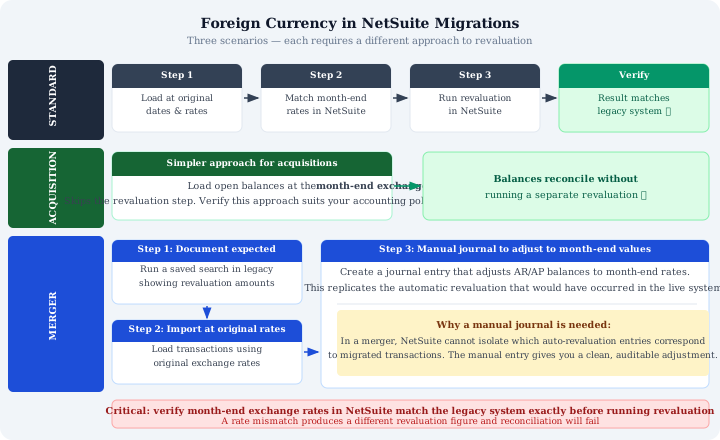
Standard Migrations: Load at Original Rates
For a standard migration, moving from one system to NetSuite without a business combination event, the approach has three steps.
- Load transactions at their original dates and exchange rates. Not the current rate, not the month-end rate at migration. The rate that was active when the transaction was first recorded in the legacy system. This preserves the transaction's original functional currency value.
- Ensure month-end exchange rates in NetSuite match the legacy system exactly. This is the step most implementations miss. If the month-end rate in NetSuite is even slightly different from the rate used in the legacy system, the revaluation will produce a different figure and reconciliation will fail. Check rates before running the revaluation, not after.
- Run the NetSuite revaluation. With correct original rates on transactions and correct month-end rates in the currency table, the revaluation should produce the same unrealised FX adjustment as the legacy system. The closing balance will match.
The logic is simple: if you load at the current rate instead of the original rate, the transaction appears to have no FX movement. NetSuite has nothing to revalue. The balance looks right on the day of migration but will behave incorrectly from that point forward as exchange rates continue to move.
Asset Acquisitions: A Simpler Approach
In an asset acquisition, you are taking on a balance sheet, receivables, payables, inventory, fixed assets, at a point in time. The original transaction history stays with the seller.
Here, the simpler approach is to load open balances directly at the month-end exchange rate rather than reconstructing original transaction rates. There is no prior transaction history to replicate, so there is no revaluation to reconcile. The balance in the functional currency is fixed at the acquisition date rate, and future revaluations in NetSuite will process correctly from that starting point.
Finance teams should confirm this treatment is consistent with their accounting policies before proceeding. In most cases it is, the acquisition creates a new carrying value at the acquisition date, but it is worth having the conversation with the auditors early.
Mergers: Three Steps and a Manual Journal
Mergers are the most complex scenario. You are combining entities, which means consolidating income statements and balance sheets, aligning charts of accounts, and handling intercompany transactions. The FX revaluation problem is correspondingly harder.
The issue: in a live NetSuite environment, the system automatically assigns revaluation entries to specific transactions. In a migration where you are combining two instances, it becomes impossible to isolate which auto-revaluation entries correspond to which migrated transactions. The standard automatic revaluation process breaks down.
The approach that works:
- Run a saved search in the legacy system documenting expected revaluation amounts by currency and entity. This gives you the target figures before you touch the new system. You need to know what the revaluation should produce before you try to replicate it.
- Import transactions at original exchange rates. Same as the standard migration approach, preserve the original rate on each transaction.
- Create a manual journal entry to adjust AR and AP balances to month-end values. This entry replicates the revaluation that would have occurred automatically in a live system. Because it is manual and discrete, it is auditable, you can point to it and say exactly what it represents and why it was posted.
The manual journal is not a workaround. It is the correct treatment for a merger migration. It gives you a clean, documented adjustment rather than relying on the system to produce a revaluation that it cannot reliably attribute to the right source transactions.
The Rate Matching Problem
Across all three scenarios, the single most common cause of revaluation reconciliation failures is a mismatch between the month-end rates in NetSuite and the legacy system. Exchange rate tables in ERP systems are maintained manually or via feed, and small differences, a rate entered to four decimal places in one system and five in another, will produce a different revaluation figure on large balances.
The discipline required is simple: extract the month-end exchange rates from the legacy system, load them into NetSuite verbatim, and confirm the match before running the revaluation. Do not rely on a third-party rate feed to produce the same figures independently. It usually will not.
If you discover a mismatch after running the revaluation, reversing it and rerunning is simple in NetSuite, but it delays the migration and creates unnecessary noise in the audit trail. Check first.
Fowlers Consulting Services Ltd are an AI-first NetSuite consultancy based in the UK. If you need help planning or executing a NetSuite data migration, get in touch.