
Every NetSuite implementation encounters an early decision: how far back should historical data extend? Finance teams often favor loading everything, complete transaction records spanning years. However, this approach rarely delivers value and frequently creates complications, particularly for expanding businesses with multiple entities.
The critical question to ask: “What reports do users need immediately after go-live?” rather than “How much data can we migrate?” This reframing typically leads to one of three distinct approaches.
Option 1: Balance Sheet Only
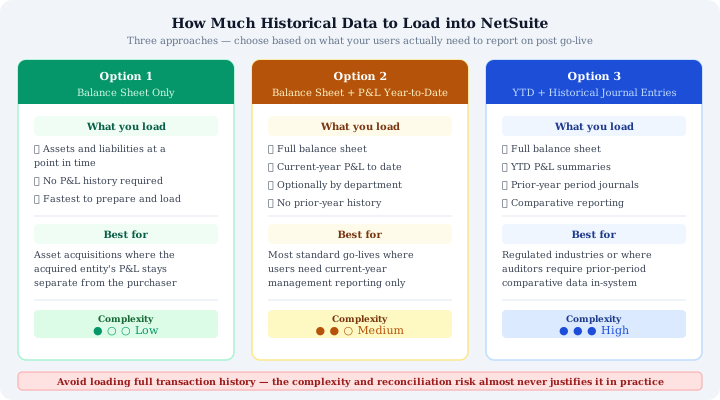
Load a single closing balance sheet snapshot containing only assets and liabilities, no P&L history, no transaction records, just the opening balances needed to initialize the new system.
This approach works best for acquiring another entity. The acquired business maintains its own historical P&L documentation. What matters for the acquiring company is the balance sheet at acquisition: receivables, payables, inventory, fixed assets, and liabilities being assumed.
This remains the fastest, cleanest option. Reconciliation involves matching a small set of account balances against a closing balance sheet. The error risk stays low, and data volume remains minimal.
This differs fundamentally from mergers, where combining both entities’ income statements typically becomes necessary, a materially more complex undertaking.
Option 2: Balance Sheet Plus P&L Year-to-Date
Combine the balance sheet with a current-year profit and loss summary through today. This can appear as a single consolidated figure or break down by department based on management reporting needs.
For standard implementations, this proves optimal. Finance teams receive current-year actuals in NetSuite immediately, enabling month-end reports, departmental P&L analysis, and year-to-date comparatives from day one. Rather than migrating historical transactions, you’re loading summaries representing their net effect.
How to Load NetSuite Opening Balances for Option 2
Use this test: if users only need comparing this month against the same prior-year period, Option 2 almost always suffices. Post the NetSuite opening balances for the balance sheet, then enter the previous year comparative as either a statistical balance or single journal entry per account. Transaction-level history becomes unnecessary for report generation.
Option 3: Balances with YTD P&L Plus Historical Journal Entries
Organizations requiring deeper historical context, for audit compliance, regulatory obligations, or detailed trend analysis, extend Option 2 by incorporating individual period journal entries for prior years.
Reconciling Summarised Journal Entries Against Your Legacy System
The mechanism remains straightforward: create one summarised journal entry per accounting period per account instead of loading every original transaction. The net effect matches loading underlying transactions, but data volume shrinks dramatically while error risk decreases substantially. Each period’s summarised journal reconciles against the legacy system’s closing trial balance, maintaining NetSuite accuracy without carrying underlying detail.
This distinction matters significantly. Legacy systems contain accumulated errors, corrections, and adjustments. Migrating raw transactions doesn’t just preserve correct closing balances, it carries forward all associated noise too. Reconciling five-year transaction history that worked in one system but behaves differently in another becomes expensive, and rarely yields actionable insight.
Summarised period journals provide historical depth without accumulated accounting errors. This approach suits PE-backed businesses undergoing due diligence or any business with statutory audits requiring period-by-period comparatives.
The Risk of Loading Full History
Complete historical data migration demands weeks of extraction, transformation, and validation, delaying go-live significantly. It creates data volumes that degrade system navigation performance in early months. It introduces errors in legacy data that prove difficult identifying and reconciling. Typically, historical transactions remain queried rarely after NetSuite go-live, becoming an untouched archive.
Organizations genuinely needing full transactional history almost always maintain specific, documented reasons: named regulatory obligations, active audits, or ongoing legal matters. Without these concrete drivers, loading complete history reflects emotional preference rather than operational necessity.
Which Approach Is Right?
- Acquisition of another entity: Option 1. Load the closing balance sheet and proceed.
- Standard go-live with current-year reporting needs: Option 2. Balance sheet plus YTD P&L, segmented by department if management requires it.
- Regulatory, audit, or detailed historical reporting requirements: Option 3. Balances with YTD P&L plus prior-year summarised journal entries by period.
Drive the decision using one concrete question: Which reports must users run from day one, and how far back must they reach? “Current year and last year comparative” answers point toward Option 2. “Period-by-period for three years” answers indicate Option 3 without raw transactional data risk.
Loading complete history almost never proves necessary. Define reporting requirements first, then select the lightest approach satisfying them. This historical data scoping represents one earliest 12-week data migration framework steps, establishing the complete sequence.