

NetSuite’s amortisation and Transaction Line Distribution (TLD) modules each function effectively in isolation, yet create fundamental conflicts when applied simultaneously to vendor bill lines. Resolving this incompatibility demands custom scripting that navigates around locked SuiteApp code.
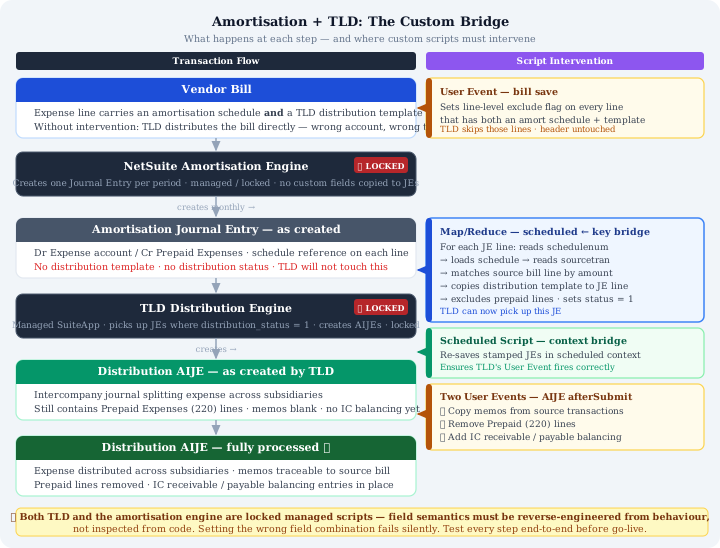
How NetSuite Expense Amortisation Works
Expense amortisation spreads prepaid costs across multiple accounting periods rather than recognising them immediately. When an amortisation schedule attaches to a vendor bill line, two things occur:
- The line posts to Prepaid Expenses on the balance sheet instead of directly to the expense account
- NetSuite generates journal entries, one per scheduled period, that release the prepaid balance into the profit and loss account
These generated journals carry schedule references linking back to the original bill, creating an automated accounting chain. Critically, the amortisation engine does not transfer custom field values from source bills to generated entries.
How Transaction Line Distribution Works
TLD automatically splits transaction lines across multiple subsidiaries using percentage templates, generating necessary intercompany journals. Configured through custom fields on transaction lines, TLD operates via a scheduled Map/Reduce script that processes transactions flagged for distribution.
As a locked Oracle SuiteApp, TLD’s internal logic cannot be inspected directly, making it necessary to infer behavior through observation.
Why the Two Modules Obstruct Each Other
When both features apply to the same vendor bill line, neither handles the scenario correctly:
- TLD attempts distributing the bill directly, but this proves wrong since expenses remain in Prepaid Expenses, not yet in the P&L. This creates double-counting once amortisation entries post in subsequent months
- Amortisation-generated journals lack distribution templates, so TLD ignores them entirely. The monthly expense releases never distribute across subsidiaries
The result forces a choice between incorrect approaches: distribute the bill wrongly or skip distribution entirely.
Bridging This Gap Requires Custom Scripting
Three interventions are necessary:
Prevent direct bill distribution. Set line-level exclusion flags (custcol_vid_exclude_distribution = true) on any line featuring both amortisation schedules and distribution templates, allowing TLD to skip those specific lines while processing others normally.
Stamp distribution templates onto amortisation journals. When the amortisation engine creates monthly entries, custom scripts must locate relevant journals, trace through the schedule chain to the original bill, read its distribution template, and apply it to corresponding journal lines. This requires setting appropriate header-level TLD fields signalling readiness for distribution.
Handle post-distribution cleanup. Amortisation journals contain both expense lines and prepaid release lines. TLD will attempt distributing both, requiring prepaid lines to be excluded. For intercompany distributions, resulting journals need intercompany balancing entries added and prepaid lines removed.
The Locked Scripts Problem
Working with locked modules presents significant challenges. Custom code interacts with interfaces you cannot fully inspect. While custom fields remain visible, their exact internal usage patterns, valid combinations, and failure conditions often require reverse-engineering through data examination.
The original implementation contained several critical errors:
The header-level lock
Setting custbody_vid_distribution_status = 2 (Distributed) prevented TLD from processing the entire bill, including lines intended for distribution. This silently skipped non-amortised lines on mixed bills. The correct approach uses line-level exclusion only.
The header default distribution template
Applying custbody_vid_default_dist_tmplt caused TLD to distribute all lines lacking line-level templates, including Prepaid Expenses entries that should remain excluded. Header defaults instruct TLD to apply templates to unspecified lines, inadvertently including balance sheet accounts.
Template matching against truncated strings
Identifying amortisation journals through text string matching proved fragile. Database examination revealed that actual stored template names were truncated differently than their UI display, requiring reverse-engineered values rather than documented ones.
The script that never ran
The critical automation script, responsible for carrying distribution templates to amortisation journals, was hardcoded to process a single specific journal ID. All filtering conditions were overridden or commented out. The script had never executed automatically; finance teams manually applied templates monthly.
Execution Context and the Re-Save Problem
Stamping distribution fields onto amortisation journals did not guarantee TLD would process them. When Map/Reduce scripts saved records after adding distribution fields, TLD’s User Event sometimes failed to fire properly.
The solution involved a secondary scheduled script running after Map/Reduce completion. Its sole purpose: locate journals stamped with distribution fields but lacking distribution journals, then re-save them in scheduled script context. This provides TLD’s User Event the execution environment it requires.
What a Correct Implementation Looks Like
A working solution requires a coordinated script chain:
User Event on vendor bills: Fires on save, setting line-level exclusion flags on lines with both amortisation schedules and distribution templates. Handles both item and expense sublists, clearing flags when schedules are removed.
Map/Reduce stamping script: Runs on schedule, locating unstamped amortisation journals. For each journal, traces schedule references to source bills, reads distribution templates from matching lines, and applies them to journal lines. Explicitly excludes prepaid lines using line-level flags while setting necessary header fields. Avoids header default templates that would override exclusions.
Re-save scheduled script: Executes afterward, re-saving stamped journals lacking distribution entries in fresh execution context, allowing TLD’s engine to fire reliably.
Distribution journal User Event: Processes resulting distribution journals, copying line memos from source transactions and adding intercompany balancing entries while removing incorrectly included prepaid account lines.
Key Takeaways
Understand field semantics thoroughly. Know the distinction between header default templates and line-level templates, and which combinations trigger specific TLD behaviors. Incorrect combinations produce unintended distributions silently.
Prioritize line-level controls. Header-level fields affect all transaction lines. With mixed transactions containing both amortised and non-amortised distributed lines, header interventions inadvertently impact unintended lines. Line-level exclusion proves more surgical.
Trace field chains before coding. The path from amortisation journal line to source bill line traverses the schedule record. While reliable, this chain requires multiple record loads per line. Batch processes loading records in cascading loops encounter governance limits on large journals; search-first approaches prove substantially more efficient.
Test with production-realistic scenarios. The original scripts appeared functional because production data contained no mixed bills. A robust implementation must survive scenarios current data happens not to contain. Test thoroughly before deployment.
Document the complete field inventory. Understand every custom field both modules read or write, identifying header versus line-level fields and which values trigger specific behaviors. This requires data examination and controlled sandbox testing, slow work, but essential.