
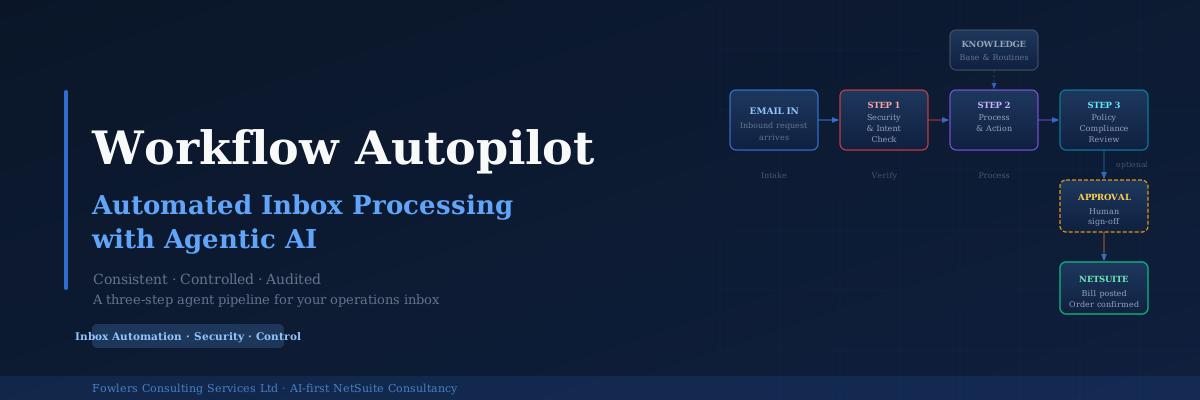
AP inbox automation for NetSuite represents a significant efficiency opportunity for finance teams, though implementation requires careful attention to control and auditability. This guide addresses the needs of CFOs, financial controllers, and finance transformation leaders managing NetSuite environments who want automation benefits without sacrificing oversight.
The Shared AP and Orders Inbox Nobody Controls
Finance and operations teams typically face a common challenge: inboxes that function based on “whoever gets there first” principles. The AP inbox, orders inbox, and supplier queries inbox lack formal structure, with emails processed manually through spreadsheet transcription and ad-hoc approvals. While functional, these processes suffer from:
- Absence of audit trails
- Transcription errors rather than decision-making errors
- Consistency dependent on individual operators
- Fragility when regular staff members are unavailable
What Good AP Inbox Automation Must Accomplish
Effective AP inbox automation requires addressing several critical dimensions:
- Genuine comprehension of email content, not just text extraction
- Validation of details against NetSuite records (purchase orders, supplier data, product codes)
- Application of organizational policies, including approval thresholds and coding standards
- Maintaining human oversight for actions carrying significant risk
- Direct handling of exceptions rather than silent failure modes
- Complete, timestamped documentation of all actions and reasoning
Many automation disappointments stem from tools that address only the initial requirements while neglecting the remainder.
Why Single-Step AI Approaches Fall Short
A common impulse involves directing an AI system at the inbox to extract invoices and create bills automatically. While this appears efficient, single-step approaches introduce distinct risks:
- The agent cannot distinguish legitimate supplier invoices from fraudulent ones without explicit testing
- No independent verification exists for procedural compliance
- Post-action review capabilities are absent, preventing after-the-fact deviation detection
- Speed without control constitutes accelerated errors rather than genuine progress
Agentic AI vs RPA vs Chatbots
These three approaches are frequently conflated despite substantially different operational characteristics:
| Approach | How it works | Where it struggles |
|---|---|---|
| Chatbot/assistant | Answers questions and drafts text when prompted, leaving action to the user | No control over outcomes, no NetSuite validation, no audit trail for business actions |
| RPA (robotic process automation) | Follows coded scripts and clicks through screens exactly as programmed | Breaks on process variation; requires recoding when layouts or procedures change |
| Agentic AI | Reads emails contextually, validates against NetSuite, applies documented procedures, flags uncertain decisions | Requires documented procedures; needs human approval on sensitive actions |
Workflow Autopilot operates firmly within the agentic category, it actively manages processes rather than awaiting prompts, handles PDF layout variations gracefully, and executes operational workflows with reviewable outputs.
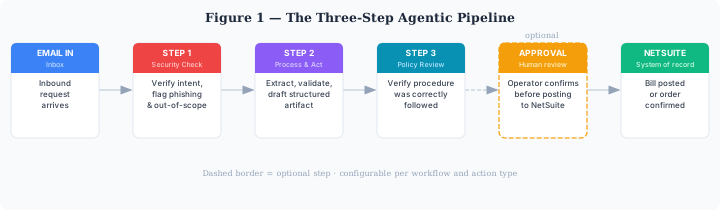
How the Agentic AP Pipeline Works
Workflow Autopilot processes incoming emails through three sequential agent steps before actions reach systems or approvers, followed by human approval for sensitive operations.
Step 1: Security and Intent Check
The agent assesses email legitimacy before any processing occurs. It identifies phishing indicators, social engineering attempts, and out-of-scope requests, flagging suspicious communications rather than processing them. This represents the initial fraud detection layer.
Step 2: Process and Action
Following clearance, the agent extracts relevant data, invoice fields, purchase order lines, customer details, validates this information against NetSuite, and produces a structured business object: a proposed bill, draft sales order, or suggested reply. This generates a reviewable record with defined fields rather than unstructured summaries.
Step 3: Policy Compliance Check
A second agent reviews the processing agent’s output, verifying correct field extraction, appropriate coding application, and proper flagging of discrepancies. This step catches procedural deviations before human review or system posting.
Step 4: Human Approval
For sensitive actions, bill posting, sales order confirmation, processed artifacts require explicit operator sign-off before NetSuite updates. Lower-risk actions can proceed automatically once automated checks clear. This creates deliberate human-in-the-loop automation: machines prepare, people retain authority.
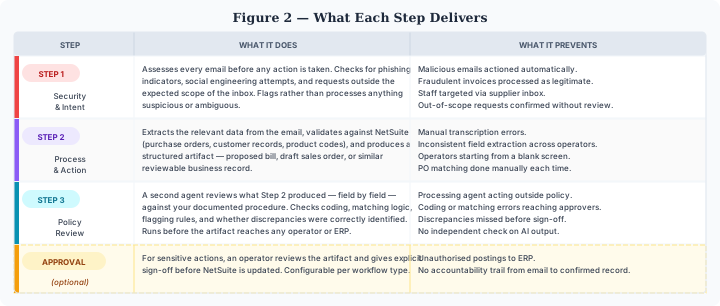
What Each Step Checks and Produces
| Step | What it does | What it prevents |
|---|---|---|
| Security & intent | Assesses every email before action; checks for phishing and social engineering; flags suspicious or ambiguous content | Malicious email actioning; fraudulent invoice processing; staff targeting; out-of-scope requests without review |
| Process & action | Extracts data from emails; validates against NetSuite records; produces structured reviewable artifacts | Manual transcription errors; inconsistent field extraction; operators starting from blank screens; repeated manual PO matching |
| Policy review | Second agent reviews processing output field-by-field against documented procedures; checks coding, matching logic, and flagging rules | Processing agent deviations from policy; coding or matching errors reaching approvers; missed discrepancies; absent independent AI output verification |
| Human approval (sensitive actions) | Operator reviews artifact and provides explicit sign-off before NetSuite updates; configurable per workflow type | Unauthorized ERP postings; absent accountability trails from email to confirmed record |
AP Bill Processing Example
When a supplier sends an invoice to the AP inbox:
Step 1 verifies the sender legitimacy and content structure, confirming it as a legitimate supplier invoice. It passes processing.
Step 2 extracts invoice fields, matches them to open purchase orders in NetSuite, checks amount tolerances, and drafts a proposed bill. Missing POs or amount discrepancies trigger flagging rather than proceeding.
Step 3 reviews extraction accuracy and matching logic, verifying invoice number capture, VAT treatment application, and discrepancy identification. Once cleared, the artifact reaches an approver.
The approver receives the original email, extracted data, matched PO, proposed bill, and issue summary, then approves or returns it for revision. Upon approval, the bill posts to NetSuite with full sequence logging including timestamps.
From Email to Sales Order in NetSuite
The identical pipeline transforms inbound customer purchase orders into sales orders without manual re-keying. A customer sends a PO by email. Step 1 confirms it originates from a known contact. Step 2 extracts order lines, validates product codes and pricing, and drafts a sales order. Step 3 reviews draft completeness and policy compliance, correct pricing tier application, MOQ rule observation, credit status verification.
The draft sales order goes to an operator for confirmation. Standard customer orders complete in minutes versus manual equivalents. Complex orders with unusual terms receive pre-built drafts rather than blank screens.
The Audit Trail Behind Every Action
Finance leaders consistently value the complete record most highly. Every email, agent step, flag, and approval decision receives timestamped documentation. When auditors or board members question particular bill postings, answers emerge as complete audit trails rather than recollections of staff actions.
This record feeds naturally into period-end processes, reducing surprises during month-end close procedures and supporting proper balance sheet sign-off documentation.
Consistency at Scale
Pipeline value becomes apparent at volume. When teams manually handle thirty AP invoices weekly, work quality varies based on staff availability and workload. The agent handles each consistently. Step 1 applies identical checks; Step 2 applies identical extraction and validation; Step 3 asks identical review questions.
Exceptions appear explicitly rather than silently. PO matching failures or suspicious senders surface as deliberate decision points within audit logs rather than gaps. Over time, organizations gain visibility into exception patterns and procedural effectiveness.
Where Human Judgement Remains Essential
This approach does not eliminate the need for people; it repurposes their time. The agent deliberately stops rather than guessing. Unusual supplier terms, first invoices from new vendors, credit-limit-breaching orders, and suspected fraud surface for human decision-making rather than silent resolution.
AI excels at repetitive, verifiable AP and order processing tasks. People retain superiority in judgment calls, relationships, and genuine exceptions. Good automation makes this labor division explicit rather than concealing it.
Bringing This to Your NetSuite Environment
Workflow Autopilot performs optimally when codifiable procedures exist, even if currently residing only in individual staff knowledge. Shared inboxes involving NetSuite data entry, informal email/chat approval steps, and unreliable audit trails represent ideal candidates.
It complements other services including agentic product catalogue onboarding, delivered through NetSuite automation services alongside additional NetSuite products. As an Anthropic Partner Programme member, Fowlers Consulting builds these agents using frontier models incorporating finance-specific controls.
Frequently Asked Questions
What is AP inbox automation for NetSuite?
Converting arriving emails in accounts payable or orders inboxes, supplier invoices, customer purchase orders, related requests, into validated NetSuite records. Controlled approaches read emails, validate against NetSuite, apply organizational policies, and route sensitive items to people for approval.
How is agentic AI different from RPA for accounts payable?
RPA follows coded scripts and fails when invoice layouts change. Agentic AI reads requests contextually, validates against NetSuite, and flags unconfident decisions, handling real supplier inbox variation successfully.
Does the AI post invoices to NetSuite automatically?
For sensitive actions like bill posting or sales order confirmation, no. Processed artifacts require explicit operator sign-off before NetSuite updates. Lower-risk actions can proceed automatically once automated checks clear.
How does it handle UK VAT checks on supplier invoices?
The processing agent checks VAT treatment during validation, and the policy-review step confirms it before bill approval. Approvers see and sign-off on figures, ensuring systematic and human verification.
Can it detect fraudulent or suspicious invoices?
The first step assesses every email for phishing indicators, social engineering attempts, and out-of-scope requests, flagging suspicious content for human handling. It reduces automatic fraudulent invoice actioning risk but does not replace broader fraud controls.
What audit trail does it leave?
Every email, agent step, flag, and approval decision receives timestamped recording, providing complete trails from email arrival through NetSuite confirmation.
Can it process customer sales orders as well as supplier invoices?
Yes. The identical pipeline converts inbound customer POs into draft sales orders, validating product codes, pricing tier, MOQ rules, and credit status before operator confirmation.